Guidelines for Posters
General Information
Posters will be presented during the special poster session on Tuesday 13 at the UPatras conference centre (room 12). Please note that due to the large number of submissions, presentations during plenary session are limited to 2 minutes strictly.
Presenters of posters should contact the technical support team and the session moderator during the morning registration time on Tuesday October 13, to arrange presentation details.
All posters will be exhibited at the UPatras conference centre (ground floor, room 6) on Tuesday October 13 from 09:00–14:30. Presenters of posters are expected to be available for discussion next to their poster during the coffee break on October 13 and should be available for joining a Zoom session with interested participants during the coffee and lunch breaks on Tuesday 13th of October.
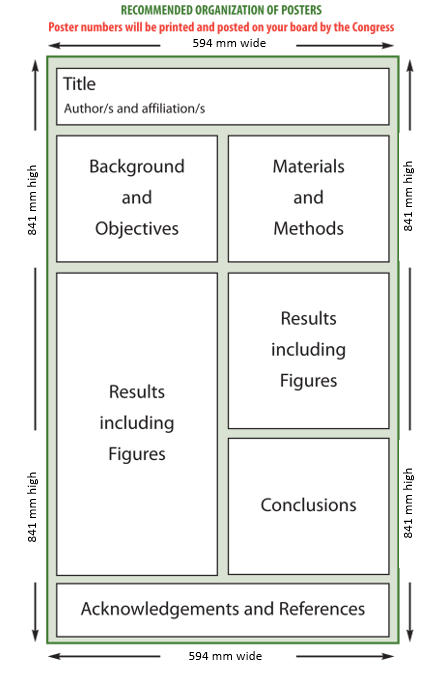
All posters should be printed in A1 portrait format (594mm × 841mm).
Online presenters of posters should send their poster in PDF format, in a printable form, to the organizing committee (email: umac2026.greece@gmail.com) before the 5th of October.
To Make a Successful Poster Presentation
- The poster must correspond to the title and content of the abstract submitted.
- The poster must be planned in logical sequence.
- Posters should be designed for clear viewing from a distance so that they can be viewed by a number of people at the same time.
Poster content is often arranged in columns on an invisible grid. Draw a storyboard; sketch out a possible arrangement of the sections, showing boxes for titles, text and graphics.
Keep text to a minimum; a typical poster contains about 1000 words. Use illustrations (graphics, photography...) to convey most information with accurate captions: illustrations should present what the viewer should understand.
There are no hard and fast rules for the sections in a poster. Here is a suggested list:
- Title with authors and affiliations
- Introduction / Objectives / Aims / Problem / Goal
- Methods
- Results
- Conclusion
- References
- Acknowledgements
- Contact information
Put your research objective in a prominent place, usually the upper left of a poster where a reader’s eyes will land first.
Keep all elements of a section close to one another. Leave space between sections. You can label the different sections as I, II, III; or 1, 2, 3; or A, B, C; making it easier for a viewer to follow your display.
Charts, drawings and illustrations are usually similar to those used in making slides - preferably with bolder, heavier figures. To ensure visual effectiveness of your poster, use large lettering and a minimum of text. Also use different font sizes, styles, and colors.
Section's Content
Objective / Introduction
Give context for your work by stating what’s already known about the topic. Then show how your question fits into that framework and seeks to expand or explain some aspect of it.
Methods Section
Keep the methods section minimal. Consider using a graphic of the steps or making a bulleted list.
Results Section
Organize the data. A table is much better than a list, but use a bulleted list if appropriate. Don’t forget to put units on everything. Results sections typically have very little text. Illustrations work particularly well here.
Conclusions Section
State what you found in your research and note its significance. Address the question you proposed in the introduction using the same terminology and phrasing. Explain how your results added to the knowledge base in your field and how your results might be used.
References Section
Use small type and keep your list of references short (three to five entries).
Acknowledgments Section
Acknowledge the people who contributed directly to the work and any funding you received. Keep the section short.
Contact Information Section
Include your full name and institution affiliation address. Provide the URL of your institution. Possibility to include QR code.
Copyright
If you use images that are not royalty-free, you must include the copyright information for each image.